Slotbound Wiki › Platforms
Slotbound platforms: PC, Mac, Steam Deck, mobile and consoles
Slotbound's platforms are Windows and Mac, both sold on Steam, and the game is Steam Deck Verified. Optima Arch, who makes this slot machine roguelite tower defense alone, has said mobile and Switch versions are planned but has given no date. There is no PlayStation or Xbox version.
-
Available
Full game and free demo on Steam
-
Available
Full game on Steam, Apple M1 or newer
-
Verified
Valve's top rating
-
Planned
No date yet
-
Planned
No date yet
-
Planned
No date yet
-
Not on Steam
No Linux build of the full game
-
Not announced
-
Not announced
Is Slotbound on mobile, iOS or Android?
No. You can't buy Slotbound for phones or tablets. The developer has answered the question twice on the Steam forums:
- 30 July 2026: the game would come out on Steam first, with mobile and Switch releases planned.
- 26 October 2026: asked in Korean about a mobile release, the developer replied that mobile is being planned.
Neither answer named a date, a price or a store, and the full game shipped on 12 November 2026 for PC and Mac only.
Slotbound APK and copies on phones
Since Optima Arch has released nothing for phones, an APK download or a phone app sold as Slotbound is not the developer's game.
A month before launch, players found a copy of the game running as a WeChat mini-game. The developer answered on the Steam forums that they had never licensed any WeChat mini-game (18 October 2026), then that they had found the pirated mini-program and would take legal action (19 October).
Slotbound platforms on console: Switch, PS5 and Xbox
Nintendo Switch: named in the same 30 July 2026 reply as mobile. The developer has given no date and has not said which Switch model.
PlayStation and Xbox: Optima Arch has not announced either, for any console generation.
Slotbound on Steam Deck
Valve rates Slotbound Steam Deck Verified, its top rating. Valve's test found that the default controls work fully, the on-screen button icons match the Deck, text is readable and the default settings run well. Controller support came with the 5 October 2026 demo update, and the Steam store page lists full controller support, DualShock and DualSense included.
Slotbound controls on keyboard and controller
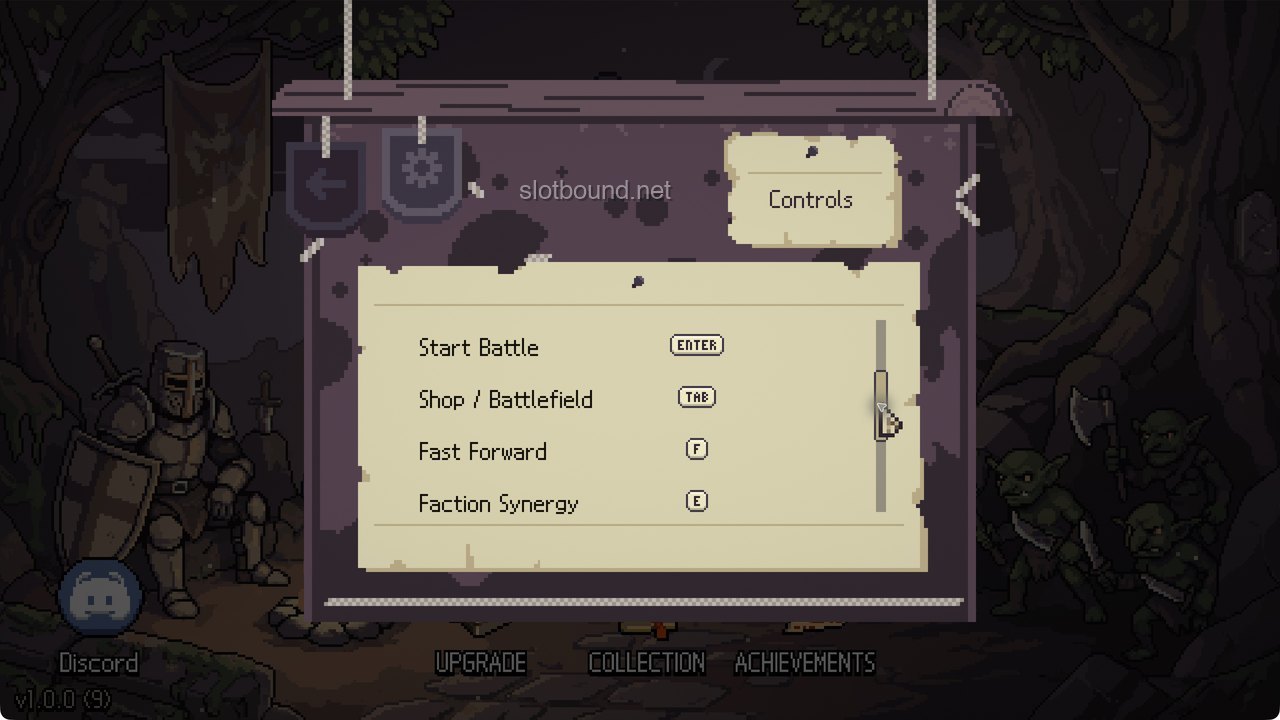
These are the default bindings on the game's Controls screen (Settings, then Controls), with Button Icons on Auto. Turn on Show Shortcut Keys in Controls to see the keyboard binding on each on-screen button that has one. For Collection and Pause the controller column shows only an icon; the 15 November update calls the Collection one the View button.
| Action | Keyboard | Controller |
|---|---|---|
| Spin | Space or S | X |
| Absorb Mode | A | LB |
| Start Battle | Enter | RB |
| Shop / Battlefield | Tab | LT |
| Fast Forward | F | RT (the row reads Fast Forward / Fate Stones) |
| Faction Synergy | E | RS |
| Damage | D | LS |
| Collection | C | View |
| Pause | Esc | ☰ (three-line icon) |
| Select | - | A |
| Back | - | B |
| Inspect | - | Y |
The 17 November update added three keyboard shortcuts: Q for Fate Stones, R for Shop Reroll, and 1, 2 and 3 for Nudge 1, 2 and 3. They can be changed on the Controls screen.
With a mouse you drag units to place them on the field and right-click a unit to keep its info panel open; a left click on empty ground closes it again. The controller view adds Vibration and Cursor Speed. The rest of Settings covers Display Mode, Window Size, V-Sync, Max FPS, Screen Shake, three volume sliders, Language and the tutorial.
Mac and Linux
Mac: the full game is on Steam for Mac. The developer said on 15 October 2026 that a Mac version was planned, and it shipped at launch.
Linux: Steam sells no Linux build. The Deck's Verified rating covers the Deck itself, not Linux desktops in general.
Slotbound system requirements
The Steam store page lists these minimum and recommended specs. Windows needs a 64-bit Windows 10 or 11; a Mac needs an M1 chip or newer.
Windows
| Minimum | Recommended | |
|---|---|---|
| OS | Windows 10 (64-bit) | Windows 10/11 (64-bit) |
| Processor | Intel Core i3-6100 / AMD Ryzen 3 1200 | Intel Core i5-8400 / AMD Ryzen 5 2600 |
| Memory | 4 GB RAM | 8 GB RAM |
| Graphics | NVIDIA GTX 750 Ti / AMD Radeon HD 7850 | NVIDIA GTX 1060 / AMD RX 580 |
| DirectX | Version 11 | Version 12 |
| Storage | 2 GB available space | 2 GB available space |
Mac
| Minimum | Recommended | |
|---|---|---|
| OS | macOS 12 Monterey or later | macOS 13 Ventura or later |
| Processor | Apple M1 | Apple M2 or better |
| Memory | 8 GB RAM | 8 GB RAM |
| Graphics | Apple M1 integrated graphics | Apple M2 integrated graphics or better |
| Storage | 1 GB available space | 1 GB available space |
Slotbound free demo
The Slotbound demo is free on Steam and runs on Windows only. It went up on 10 July 2026, four months before the full release, and was updated until October (demo updates).
The full game is bigger, with a reworked upgrade tree, and demo progress does not carry over to it.
Languages
The Steam store lists 13 languages: English, Korean, Japanese, Simplified Chinese, Traditional Chinese, French, German, Italian, Spanish (Spain), Portuguese (Brazil), Polish, Russian and Turkish. Turkish was the last one added, in the 15 November 2026 update. You change the language in Settings, which the developer pointed a Chinese player to during the demo.
Where to get Slotbound
- Slotbound on Steam: the full game for Windows and Mac, out since 12 November 2026 at a list price of $9.99.
- Slotbound Demo on Steam: free.
- Optima Arch on itch.io: free early playtest builds for Windows and one for Linux. The full game is not sold there.
Comments
Site
No comments yet. Ask a question or share what worked in your runs.